





The debate between shared and managed WordPress hosting has been around for years, with website owners weighing cost against convenience. Some see shared hosting as a budget-friendly way to get started, while others prefer managed hosting for its performance and hands-off maintenance.
But the decision between managed WordPress hosting vs. shared hosting isn’t as straightforward as it seems.
Each option serves a different type of user. A small personal blog with minimal traffic doesn’t have the same needs as an online store processing hundreds of transactions daily. Performance, security, and scalability all factor into the choice, sometimes in ways that aren’t immediately obvious.
This guide compares shared and managed WordPress hosting in real-world scenarios. We’ll cover where each makes sense, what trade-offs to expect, and when alternatives like VPS or cloud hosting might be worth considering.
Let’s start with the basics.
What Is Web Hosting?
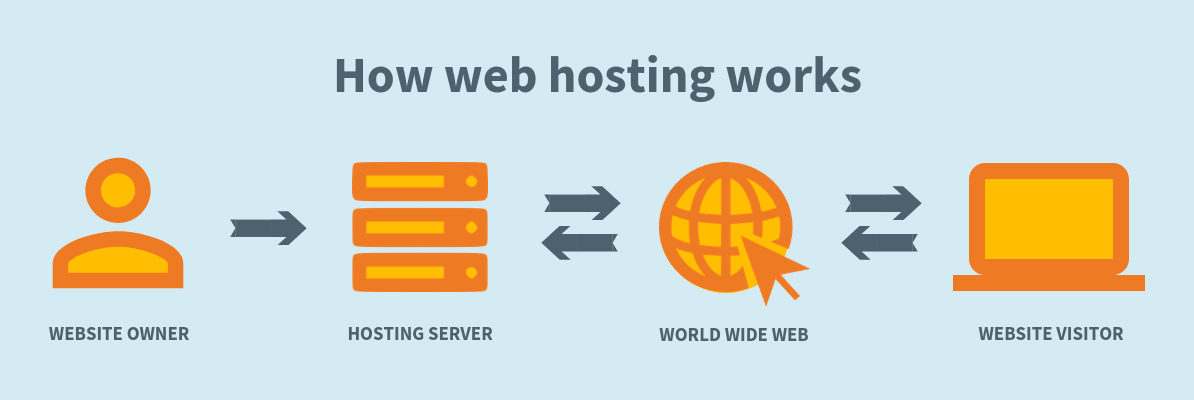
> “Web hosting provides the infrastructure needed to store and serve a website online. Hosting providers allocate space on a server, manage network access, and ensure that site data remains available to visitors at all times.”
Also Read: 9 Signs it’s Time to Upgrade Your Web Host in 2025
Now that we know what web hosting means, let’s find out why it is so necessary to distinguish between shared hosting and WordPress hosting.
Importance of Distinguishing Between Managed WordPress Hosting vs. Shared Hosting
The choice between managed and shared WordPress hosting isn’t just a technical formality. It directly affects how well your website runs, how secure it is, and how much effort you’ll need to put into maintenance.
Many website owners only realize the significance of this decision after running into slow loading speeds, security vulnerabilities, or unexpected downtime.
WordPress offers an open ecosystem where users can build everything from personal blogs to high-traffic business sites. However, hosting is what determines how well a website can handle traffic spikes, execute complex functions, and stay secure.
Ignoring the difference between managed WordPress hosting vs. shared hosting can lead to long-term frustrations. They may include constant troubleshooting on a shared server or overpaying for managed hosting when it isn’t necessary.
Understanding the trade-offs upfront ensures that you choose a hosting solution that aligns with your website’s needs rather than one that creates avoidable problems later on.
Also Read: 9 Reasons Why Premium WordPress Hosting is Worth It
Understanding Shared Hosting: What It Is, How It Works, and When to Use It
What Is Shared Hosting?
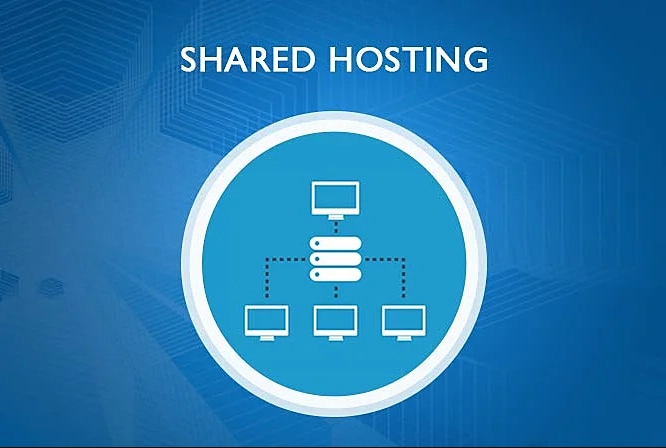
Shared hosting is an entry-level web hosting solution where multiple websites operate on the same physical server. Each website gets a portion of the server’s resources, including CPU power, RAM, storage, and bandwidth, but these resources are not dedicated.
Instead, they are shared among all users on the server.
How Shared Hosting Works
Hosting providers allocate resources through virtualization or software-based limits. While these restrictions help prevent a single website from overusing resources, they are not always strict. If one website experiences high traffic or runs a resource-intensive process, neighboring websites may slow down.
- Resource Allocation
Most shared hosting plans include a web-based control panel like cPanel, Plesk, or DirectAdmin. These interfaces allow users to manage their website files, databases, and email accounts without interacting directly with the server’s command line.
- Control Panel Access
Shared hosting servers typically run Apache, Nginx, or LiteSpeed, configured to handle multiple domains using virtual hosts. Hosting providers pre-configure these settings, so users do not need to optimize web server performance themselves.
- Web Server Configuration
Websites in a shared hosting environment store their data in structured directories. Databases (MySQL or PostgreSQL) are stored separately per user, with access restrictions to prevent unauthorized modifications.
- Database and File Storage
Providers implement user isolation through methods like CloudLinux’s CageFS or chroot environments to reduce the risk of cross-site security breaches. These mechanisms prevent one compromised website from affecting others.
- Security and Account Isolation
Shared hosting servers rely on a common network interface, distributing bandwidth among multiple users. Some providers enforce bandwidth limits to prevent congestion, while others operate on a “best-effort” model, which can lead to slow speeds during peak traffic.
- Bandwidth and Network Distribution
Advantages of Shared Hosting
- Low Cost — Shared hosting is the most affordable type of web hosting. Providers distribute server costs among multiple users, resulting in low monthly fees. Plans often start at $2 to $18 monthly, making it accessible for small businesses and individuals.
- No Server Management Required — Users do not need to handle server maintenance, security patches, or software updates. The hosting provider ensures that the server remains operational and secure.
- Easy Setup and Pre-Configured Environments — Many shared hosting providers offer one-click installations for CMS platforms like WordPress, Joomla, and Drupal.
- Free SSL Certificates and Security Tools — Most plans now include free SSL via Let’s Encrypt and some built-in security features.
- Email Hosting and Domain Management — Many plans include email hosting and domain registration options.
Disadvantages of Shared Hosting
- Limited Performance and Resource Contention — Shared hosting does not provide dedicated resources. If multiple websites experience high traffic simultaneously, overall server performance degrades.
- No Root Access or Advanced Customization — Users cannot modify system-level settings as with VPS or dedicated hosting.
- Higher Security Risks — Multiple sites on one server increase potential exposure if server software has vulnerabilities.
- Fair Usage Policies and Throttling — Providers may limit CPU, RAM, and I/O usage and throttle sites that exceed limits.
- Unpredictable Uptime and Performance — Shared hosting is more susceptible to downtime from overloads or maintenance.
Also Read: 8 WordPress Alternatives for Website Building in 2025
Understanding Managed WordPress Hosting: What It Is, How It Works, and When to Use It
What Is Managed WordPress Hosting?
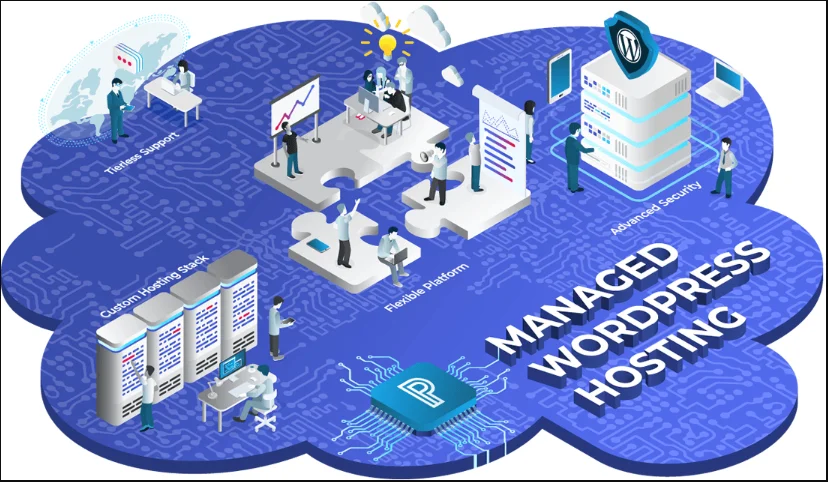
Managed WordPress hosting is a specialized hosting service designed exclusively for WordPress websites. Unlike standard hosting plans, this service is tailored to optimize WordPress performance, security, and maintenance. The hosting provider handles essential technical aspects, including software updates, security monitoring, automated backups, and performance optimization.
How Managed WordPress Hosting Works
Servers are specifically configured for WordPress (PHP versions, MySQL configs, caching).
- Optimized Server Environment
Providers handle automatic updates for WordPress core, plugins, and themes.
- Automated WordPress Management
Built-in caching, CDN integration, and optimized database queries improve load times.
- Performance Enhancements
Firewalls, malware scanning, DDoS protection, and containerization/role-based access controls are common.
- Security and Threat Protection
Automated daily backups stored remotely for quick restoration.
- Daily Backups and Disaster Recovery
WordPress-focused dashboards with staging, analytics, and plugin management.
- Custom Control Panel and Dashboard
Dedicated resources per site with options to scale or enable auto-scaling.
- Scalability and Resource Management
SSH, Git integration, WP-CLI, and staging environments for safe development workflows.
- Developer-Friendly Features
Advantages of Managed WordPress Hosting
- Performance Optimization & Speed — Server-level caching, SSD, and CDN integration.
- Automatic Updates & Security Patches — Reduced exposure to vulnerabilities.
- Daily Backups & Easy Restoration — One-click restores minimize downtime.
- WordPress-Specific Customer Support — Experts handle plugin conflicts and performance issues.
- Staging Environment for Safe Testing — Test changes without affecting live sites.
- Scalability Without Migration Hassles — Upgrade resources without complex migrations.
Disadvantages of Managed WordPress Hosting
- Higher Costs Compared to Shared Hosting — Plans typically start around $25/month and can exceed $150/month.
- Plugin Restrictions — Some plugins are restricted to maintain performance and security.
- WordPress-Only Hosting — Not suitable for non-WordPress applications.
- Website Visit Limits & Overage Fees — Visitor caps or bandwidth limits may apply.
- Limited Control over Server Configuration — Less flexibility for custom server tweaks.
Shared Hosting vs WordPress Hosting: A Comparison
1. Performance & Server Optimization
| Feature | Shared Hosting | Managed WordPress Hosting |
|---|---|---|
| Server Resources | Shared among multiple websites, leading to potential slowdowns. | Dedicated resource allocation for WordPress, ensuring stable performance. |
| Caching | Requires third-party caching plugins. | Server-side caching for improved load times. |
| Traffic Handling | Limited capacity; performance may drop during high traffic. | Optimized to handle traffic spikes with load balancing and CDN integration. |
| Database Optimization | Manual optimizations are needed. | Automated MySQL optimization to enhance efficiency. |
2. Security & Risk Mitigation
| Feature | Shared Hosting | Managed WordPress Hosting |
|---|---|---|
| Firewall Protection | Standard firewall setup. | Advanced firewall rules tailored for WordPress threats. |
| Malware Scanning | Basic scanning; additional security tools may be required. | Regular malware scanning and automatic removal. |
| SSL Certificates | Often included, but may require manual installation. | Pre-installed and automatically renewed SSL certificates. |
| DDoS Protection | Basic mitigation measures. | Enterprise-grade DDoS protection with real-time threat monitoring. |
| Security Updates | Manual updates are required for WordPress core and plugins. | Automatic updates and patch management for WordPress vulnerabilities. |
3. Ease of Use & Management
| Feature | Shared Hosting | Managed WordPress Hosting |
|---|---|---|
| Control Panel | cPanel or Plesk with a general-purpose UI. | Custom WordPress-focused dashboard for simplified management. |
| Setup & Installation | Requires manual WordPress installation. | Pre-installed WordPress with optimized settings. |
| Backup Management | Manual backups or paid add-ons. | Automated daily backups with one-click restore options. |
| Technical Assistance | General hosting support; may not specialize in WordPress. | Dedicated WordPress experts are available for troubleshooting. |
4. Scalability & Resource Allocation
| Feature | Shared Hosting | Managed WordPress Hosting |
|---|---|---|
| Traffic Capacity | Limited capacity; may require upgrading to VPS or dedicated hosting. | Optimized for scaling with increased server resources. |
| Resource Allocation | Shared resources; performance depends on server load. | Guaranteed CPU, RAM, and bandwidth for consistent performance. |
| Upgrade Options | Requires migration to higher-tier plans or different hosting types. | Flexible scaling with minimal downtime. |
5. Pricing & Cost Efficiency
| Feature | Shared Hosting | Managed WordPress Hosting |
|---|---|---|
| Cost | Budget-friendly, typically $2–$18/month. | Higher cost, usually $25–$150/month, depending on features. |
| Included Features | Basic hosting tools; security and performance enhancements may cost extra. | Premium features included (staging, CDN, automated updates). |
| Long-Term Value | Cost-effective for small websites but may lack performance and security. | Higher upfront cost but better long-term stability and fewer maintenance expenses. |
Managed WordPress Hosting vs. Shared Hosting: Which to Choose?
Selecting the right hosting plan is about aligning your website’s needs with the right infrastructure.
When Does Shared Hosting Make Sense?
- A personal blog or hobby site needs an affordable home.
- A small business website receives minimal traffic.
- A website is in the early testing phase.
- A temporary or seasonal project requires hosting.
- Budget is the primary concern.
When Does Managed WordPress Hosting Make Sense?
- Website traffic is high or unpredictable.
- An e-commerce store needs top-tier security.
- Downtime isn’t an option.
- Automatic updates and security patches are non-negotiable.
- Technical expertise is limited.
- Performance needs to be consistently optimized.
Other Hosting Options for WordPress
DIY Hosting (Self-Hosting)
DIY hosting refers to setting up and managing a server independently rather than relying on a hosting provider’s infrastructure. This approach grants full control over hardware, software configurations, and security policies.
Who This Is For: System administrators, developers, and tech-savvy users who understand server management.
VPS Hosting
VPS (Virtual Private Server) hosting allocates dedicated virtualized resources within a shared physical server, offering a middle ground between shared hosting and dedicated servers. Each VPS operates independently and provides users with dedicated CPU cores, RAM, bandwidth, and storage.
Who This Is For: Businesses running high-traffic websites, e-commerce platforms, or applications requiring consistent performance.
Cloud Hosting
Cloud hosting distributes website data across multiple interconnected servers rather than relying on a single physical machine. If one server fails, others within the network take over to ensure uninterrupted availability.
Who This Is For: Businesses requiring high uptime, fast scalability, and global reach (SaaS, growing e-commerce, enterprises).
How to Choose the Right Hosting for Your Website
See if the hosting offers:
- Scalability to handle current and projected traffic.
- Clear pricing reflecting backups, security, and performance.
- Low downtime impact and solid uptime guarantees.
- Technical involvement aligned with your expertise.
- Essential features: CPU, RAM, bandwidth, DDoS protection, SSL, staging.
- Speed: SSD storage, caching, CDN, and data center proximity.
- Security: proactive monitoring, firewall, malware scanning, frequent backups.
- Reliable 24/7 support and documentation.
- Flexibility: root access, PHP version control, plugin/theme restrictions.
- Ease of migration and setup (free migration, CMS-friendly setup).
Conclusion: Managed WordPress Hosting vs. Shared Hosting
Choosing between managed WordPress hosting vs. shared hosting isn’t just a budget decision. It’s about long-term reliability, security, and performance. Shared hosting is fine for small projects and hobby sites. But if uptime, speed, and security matter, managed WordPress hosting is often the better choice.
With FastCow, hosting is never a limitation. Every plan includes:
- Free SSL for secure, encrypted connections.
- G-Suite Integration for hassle-free business email setup.
- Domain Transfers with zero downtime.
- DNS Management that simplifies site control.
- Resource Isolation to prevent slowdowns from other websites.
- Zero-Downtime Scaling to handle traffic spikes effortlessly.
- Malware Scanning for real-time threat detection and removal.
- DDoS Protection to safeguard against cyberattacks.
- Free CDN for consistently fast loading times.
- And more!
A website should grow without hosting getting in the way. FastCow’s managed WordPress hosting keeps your site fast, secure, and stress-free. Get started today!
FAQs
WordPress hosting is tailored specifically for WordPress sites. Shared hosting involves multiple websites sharing the same server resources, which may not be optimized for WordPress.
- What is the difference between WordPress hosting and shared hosting?
Shared hosting involves multiple websites sharing server resources, often leading to limited performance and control. Managed hosting provides dedicated resources and services like security, backups, and updates.
- What is the difference between shared and managed hosting?
WordPress hosting offers an environment optimized for WordPress. Managed WordPress hosting includes additional services such as automatic updates, enhanced security, and specialized support.
- What is the difference between WordPress hosting and managed WordPress hosting?
"Hosting" is a broad term encompassing services that store and serve website data. Shared hosting is a specific type where multiple websites share the same server resources.
- What is the difference between hosting and shared hosting?
Managed WordPress hosting is often recommended for specialized features and support, but shared hosting can be suitable for smaller sites with limited budgets.
- Which type of hosting is best for WordPress?
Yes, managed WordPress hosting typically costs more due to the additional services and resources provided.
- Does managed WordPress hosting cost more than shared hosting?
"Unlimited" shared hosting refers to plans offering unlimited resources like bandwidth or storage. These plans often have fair usage policies, and excessive resource use can lead to restrictions or additional charges.
- What is 'Unlimited' Shared Hosting?