





17 Mobile Optimization Best Practices for 2025 (Plus 1 Bonus Tip!)
Have you ever clicked on a site that took too long to load? You probably didn't wait around. Now, imagine your customers doing the same. If your website isn't optimized for mobile, that's exactly what's happening.
Mobile optimization is about speed, usability, and seamless navigation. A slow checkout page can cost an e-commerce store thousands in lost sales. A poorly designed blog can drive readers away.
That said, if your site doesn’t work well on mobile, you’re losing traffic, conversions, and revenue.
This blog will explain the best mobile optimization practices, why they matter, and how to apply them. Stay tuned for a bonus tip at the end!
Let’s start by understanding what mobile optimization is.
What Is Mobile Optimization?
“It’s the process of ensuring your website works flawlessly on smartphones and tablets. It’s about making sure users can browse, shop, and engage without friction.”
Why Does Mobile Optimization Matter?
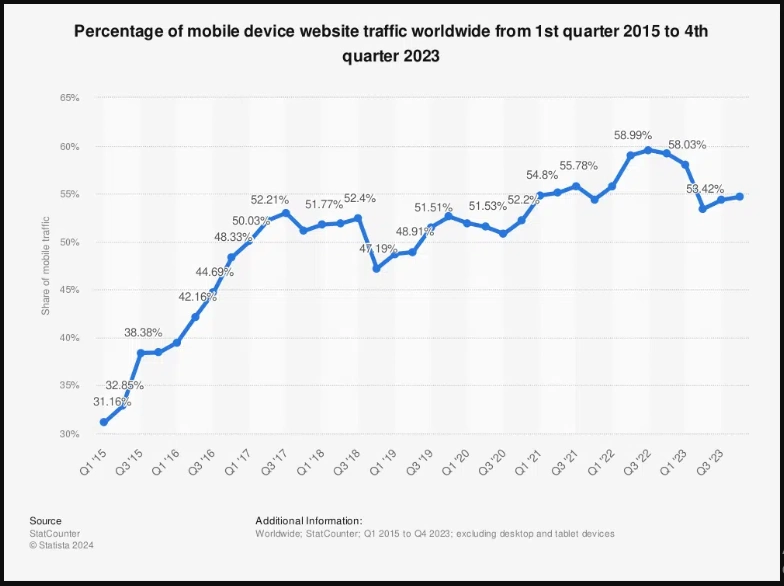
Let’s look at the numbers that stress the importance of mobile optimization best practices.
- More than half of web traffic (60%) comes from mobile. If your site isn’t ready, you’re ignoring most of your audience.
- Users expect speed. 53% will leave if a page takes over three seconds to load.
- Google ranks mobile-friendly sites higher. Mobile-first indexing means if your site isn’t optimized, you’re invisible in search results.
- Better experience = higher conversions. A well-optimized mobile site can increase the likelihood of purchases by 67%.
Simply put, mobile isn’t just part of the web; it is the web. If your site isn’t built for it, you’re already falling behind. But don’t worry about how to make it happen.
We’ve outlined 17 mobile optimization best practices for 2025 to help you succeed. Let’s get started.
1. Optimizing Performance
Performance optimization ensures that a mobile website loads quickly and runs efficiently. A mobile optimized site delivers content faster by reducing unnecessary elements, compressing assets, and improving how data loads.
Why It Matters
Mobile users expect instant access to information. A lagging site leads to higher abandonment rates and lower engagement. Search engines also prioritize fast-loading sites, meaning performance directly impacts visibility.
Without performance optimization, even well-designed sites struggle to retain visitors and convert traffic into revenue.
How to Optimize
- Eliminate unnecessary plugins, tracking scripts, and widgets. Keep only those essential for core functionality.
- Store static elements like images, stylesheets, and scripts on users' devices (caching).
- Use Google Tag Manager to organize and control script loading efficiently.
- Encrypt all data transfers and activate HTTP/2 to speed up loading by handling multiple requests at once.
2. Writing Mobile-Friendly Content
Mobile-friendly content ensures that information remains clear, concise, and easy to consume on smaller screens.
Why It Matters
Reading on a mobile device is not the same as reading on a larger screen. Users demand direct and easy-to-digest information.
How to Optimize
- Use a minimum font size of 16px for body text.
- Maintain a 1.5x line-height.
- Choose web-safe fonts or reliable font services.
- Limit color palette to 2–5 primary colors for contrast.
- Break text into short paragraphs and bullet points.
- Use clear CTAs; ensure buttons are large enough for touch.
3. Optimizing Visual Content
Why It Matters
High-resolution images can consume bandwidth, causing delays.
How to Optimize
- Convert images to WebP or AVIF.
- Serve responsive images based on screen resolution (srcset).
- Lazy-load offscreen images.
- Use tools like TinyPNG to compress.
- Add descriptive alt text.
- Avoid complex animations that slow performance.
4. Optimizing Video Content
Why It Matters
Slow-loading videos frustrate users and increase bounce rates.
How to Optimize
- Use MP4 or WebM.
- Implement Adaptive Bitrate Streaming (ABR).
- Scale the player with media queries.
- Allow user control over autoplay and sound.
- Test across devices and browsers.
- Add descriptive titles and metadata for SEO.
5. Enhancing Performance with Core Web Vitals
Core Web Vitals measure loading speed, interactivity, and visual stability.
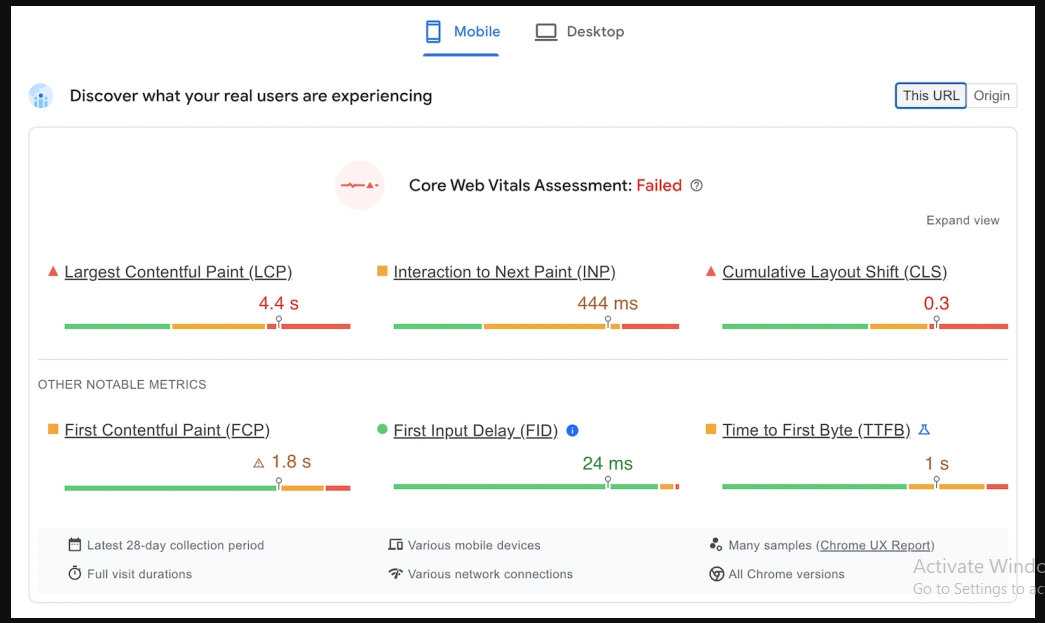
What Are Core Web Vitals?
- Largest Contentful Paint (LCP): loading performance.
- First Input Delay (FID) / Interaction to Next Paint (INP): responsiveness.
- Cumulative Layout Shift (CLS): visual stability.
How to Optimize
Improving LCP:
- Use next-gen image formats.
- Enable lazy loading.
- Use a CDN.
Enhancing FID/INP:
- Minimize JS execution time.
- Limit third-party scripts.
- Prioritize essential resources.
Reducing CLS:
- Assign dimensions to images and embeds.
- Use font-display: swap.
- Keep predictable layout structure.
6. Enhancing User Experience
User experience (UX) defines how smoothly users interact with a mobile site.
Three focus areas:
- Responsive Design
- Navigation Optimization
- Interactive Design
1. Responsive Design for Mobile Accessibility
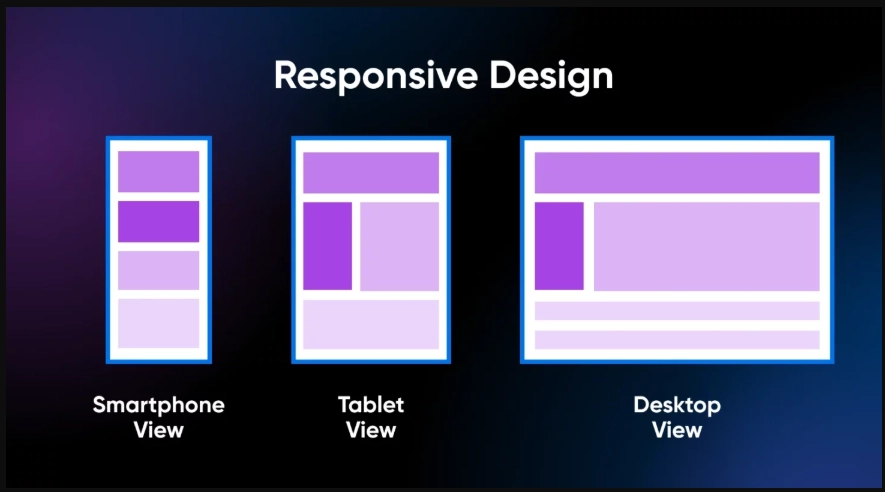
How to optimize:
- Use flexible grids and media queries.
- Test across devices and browsers.
2. Navigation Optimization for Small Screens
How to optimize:
- Design touch targets at least 44x44 px.
- Maintain spacing between interactive elements.
- Use a fixed header or hamburger menu for complex structures.
- Limit main navigation to 4–8 sections.
3. Interactive Design for Better Engagement
How to optimize:
- Add micro-interactions and subtle animations.
- Enable gesture-based navigation.
- Ensure interactions enhance usability without distraction.
7. Implementing Must-Have Security Practices
Why It Matters
Security affects user trust and experience.
How to Optimize
- Install and enforce SSL (HTTPS) sitewide.
- Enable automatic updates and remove unused plugins/themes.
- Use two-factor authentication (2FA) for admin and user accounts.
- Prefer authenticator apps over SMS.
8. Optimizing Mobile SEO
Mobile SEO ensures good rankings for mobile searches.
How to Optimize
- Implement structured data (schema.org).
- Enable rich snippets.
- Optimize content for voice search with concise answers.
9. Enhancing Voice Search and Local SEO
Why They Matter
Voice and local searches drive high-intent traffic.
How to Optimize
Voice:
- Use conversational keywords.
- Structure content with direct Q&A and FAQs.
Local:
- Optimize Google Business Profile.
- Ensure NAP consistency.
- Use location-based keywords and "near me" queries.
10. Utilizing Google’s Tools
How to Optimize
- Use PageSpeed Insights, GTmetrix, WebPageTest, and Google Search Console.
- Implement continuous performance audits: track conversion rates, bounce rates, and use heatmaps.
11. Avoiding Pop-Ups

Why Are Pop-ups a Problem?
Pop-ups frustrate mobile users and can be penalized by Google.
How to Optimize Lead Generation without Pop-Ups
- Use visible CTA buttons with clear action text.
- Use minimal slide-in banners with easy close options.
- Offer lead magnets (eBooks, PDFs) placed near content end or in sidebars.
12. Optimizing Button Size and Placement
Why It Matters
Small or poorly placed buttons reduce conversions.
How to Optimize
- Make buttons large and spaced to prevent accidental taps.
- Place essential buttons within thumb reach (lower center/right).
- Keep primary buttons consistent across pages.
13. Ensuring Emails Are Mobile-Friendly
Why It Matters
Over 55% of emails are opened on mobile.
How to Optimize
- Use responsive, single-column layouts.
- Increase font size and use tap-friendly buttons.
- Preview on multiple devices.
14. Ensuring Seamless Cross-Device Compatibility
Why It Matters
Users expect consistent behavior across devices and browsers.
How to Optimize
- Test on Safari, Chrome, Firefox, and various devices.
- Use relative units (%) and vw, combine fluid layouts with media queries.
- Use flexbox properties (flex-direction, justify-content, align-items) for layout control.
15. Optimizing for Social Media Engagement
How to Optimize
- Add social sharing buttons.
- Use mobile-friendly images and headlines.
- Implement Open Graph and Twitter Card metadata.
- Leverage social ads targeted at mobile users.
16. Enhancing Website Accessibility
Why It Matters
Accessibility improves reach, UX, and compliance.
How to Optimize
- Use semantic HTML and ARIA where needed.
- Provide alt text and enable keyboard navigation.
- Ensure color contrast and use WCAG checkers.
17. Implementing Mobile-Optimized Forms
Why It Matters
Forms drive sign-ups and conversions; poor forms cause abandonment.
How to Optimize
- Minimize required fields.
- Use correct input types (tel, email, number).
- Enable autofill and real-time validation.
The Future of Mobile Optimization: What’s Coming and What Actually Matters
Mobile is reinventing itself: faster networks, smarter AI, and changing behaviors mean previous tactics may be obsolete.
1. Search is changing
Focus on natural language, intent, structured data, and featured snippets to adapt to voice and AI-driven search.
2. PWAs
Progressive Web Apps offer app-like experiences without installs. Consider PWAs for smoother UX and higher conversions.
3. 5G
5G enables AR shopping, 4K video, and cloud gaming—optimize not just for speed but for new capabilities.
4. Mobile-First Design
Design for mobile-first: thumb-friendly navigation, prioritized speed, and minimalist UX.
5. Sustainability
Optimize for lighter pages and efficient code—faster and greener sites are becoming expectations.
Mobile Optimization Best Practices for 2025: A Skimmable Guide
| Best Practice | Description |
|---|---|
| 1. Optimize Performance | Eliminate unnecessary elements, compress assets, and improve data loading. |
| 2. Write Mobile-Friendly Content | Use clear, concise language and structured content. |
| 3. Optimize Visual Content | Use modern image formats and responsive techniques. |
| 4. Optimize Video Content | Use efficient formats and adaptive streaming. |
| 5. Focus on Core Web Vitals | Improve LCP, FID/INP, and CLS. |
| 6. Enhance User Experience | Responsive design, optimized navigation, interactive elements. |
| 7. Implement Security Practices | SSL, automatic updates, and 2FA. |
| 8. Optimize for Mobile SEO | Use structured data and voice search optimization. |
| 9. Enhance Voice & Local SEO | Conversational keywords and GBP optimization. |
| 10. Utilize Google’s Tools | PageSpeed Insights, GTmetrix, WebPageTest, Search Console. |
| 11. Avoid Intrusive Pop-Ups | Use CTAs and slide-in banners instead. |
| 12. Optimize Button Size & Placement | Make buttons large and thumb-reachable. |
| 13. Ensure Mobile-Friendly Emails | Responsive emails with tap-friendly CTAs. |
| 14. Ensure Cross-Device Compatibility | Test across browsers and devices. |
| 15. Optimize for Social Media | Add sharing buttons and Open Graph metadata. |
| 16. Enhance Accessibility | Semantic HTML, ARIA, and WCAG checks. |
| 17. Optimize Mobile Forms | Minimize fields, enable autofill, and use real-time validation. |
Final Thought: Mobile is the Default, Not an Add-On
Mobile optimization isn’t just about rankings. It’s about creating an experience so smooth that users never think about it. Brands adopting AI-driven search, PWAs, AR, and mobile-first design will succeed.
If you’re looking to improve mobile experience, FastCow’s managed WordPress hosting can help ensure your site is fast, scalable, and mobile-friendly.
Get started with FastCow today, because your website deserves to be as mobile-first as your audience.
FAQs
Slow load times from large images, lack of caching, tiny fonts, and non-touch-friendly buttons.
- What Are the Common Mistakes to Avoid When Optimizing a Website for Mobile?
Use Google Lighthouse, LambdaTest, and Responsive Test Tool.
- How Can I Test if My Website Is Mobile-Friendly?
Yes—optimize for speed, local searches, and mobile-first indexing.
- Can I Do SEO on Mobile?
Use PWAs, caching, asset compression, and touch-friendly UI.
- How Would You Optimize a Web Application for Mobile Devices?
Encrypt data, enable MFA, limit permissions, and regularly update software.
- What Are the Best Practices for Mobile Device Security?
Balancing high performance with rich media content.
- What Is the Biggest Challenge in Mobile Optimization Today?