





A website is often a business’s most valuable asset, and poor web hosting can quickly turn it into a major liability.
However, there is a problem. When things go wrong with your hosting, the signs aren't always evident immediately. Performance issues can appear slowly, often leaving you scrambling to fix problems when they've already escalated.
Recognizing the signs of a failing web host early is key to preventing bigger and more costly issues later. So, how do you know when to make the switch?
In this post, we’ll highlight the warning signs that your hosting provider isn’t delivering and walk you through the steps you can take to prevent problems from getting worse.
Let’s start with the basics of web hosting and its different types before we discuss the signs.
What Is Web Hosting and What Are Its Types?
“Web hosting is the service that allows your website to be accessible on the internet. In simpler terms, it’s like renting a space on the web where all your website’s files, images, and data live.”
Without hosting, your website would have no home, and users wouldn't be able to access it.
When you sign up for web hosting, you’re basically leasing a portion of a server (an actual computer) that stores your website’s files. These servers are connected to the internet, allowing users to view your website from any device connected to the web.
Note: A dedicated web host gives you a server that's used only for your website. It offers more control, better performance, and increased security.
How Does Web Hosting Work?
When someone enters your website’s URL into their browser, here's what happens:
- Request Sent: The browser sends a request to your hosting server, which might involve a Content Delivery Network (CDN) if your site uses one.
- File Retrieval: The server responds by retrieving the necessary files. These files may include everything from text and images to scripts and stylesheets.
- Website Displayed: The server sends those files back to the user’s browser, which assembles them into a viewable page. Within a few seconds, the visitor sees your site.
This entire process seems simple and happens in a fraction of a second. But a lot can go wrong if your hosting provider doesn’t offer the right infrastructure.
If they lack the capacity or performance capabilities, your site will lag, crash, or fail to load entirely.
Types of Web Hosting Plans
Before deciding to switch or upgrade your hosting plan, it's important to understand the different types of hosting available.
Here’s a quick guide:
Shared Hosting
This is usually the starting point for most small web host sites. In shared hosting, your site shares a server with other websites. It's a budget-friendly option, but it comes with limitations.
You may notice slower performance if another site on your shared server gets a lot of traffic or uses many resources.
WordPress Hosting
If your site is built on WordPress, you'll likely get more out of WordPress hosting. It's tailored to handle the needs of WordPress sites, offering better performance and stronger security.
Plus, WordPress is typically preinstalled, so it’s easy to begin with.
VPS Hosting
Virtual Private Server (VPS) hosting is like upgrading. It's ideal for growing websites that need more control and resources.
VPS hosting offers more flexibility than shared hosting while still being more affordable than dedicated hosting. As your site grows, it can scale with you.
Dedicated Hosting
When your website receives large amounts of traffic or has specific performance needs, dedicated hosting might be the solution. It gives you an entire server dedicated solely to your site. While it’s powerful and flexible, it’s also costly, so it's best suited for large businesses or high-traffic websites.
Reseller Hosting
For developers or agencies, reseller hosting is a great choice. It allows you to sell hosting services to your clients while managing multiple websites. This type of hosting is perfect if you’re running a web development business or want to offer additional services to clients.
Each type of hosting has its unique benefits and drawbacks. The goal is to find a good web host that fits your current needs and allows you to grow.
Also Read: 10 Reasons to Choose the Best Agency-Focused Hosting Platform.
When Your Web Host Can’t Keep Up: 9 Signs It’s Time for a Change
Even good hosts can struggle to meet the evolving needs of modern websites. Keep reading to discover nine signs showing when it's time to switch.
Plus, we’ll give you tips on how to pick a great web host to avoid these problems.
1. When Your Website Takes Too Long to Load
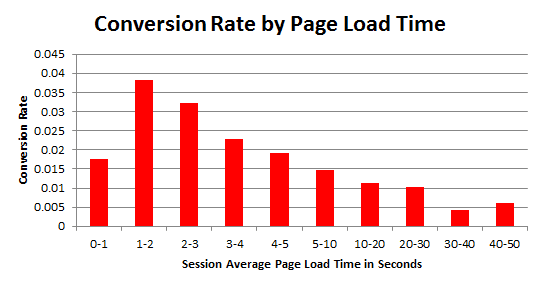
You’ve worked hard to create a compelling website, but none of that effort matters if your pages are slow to load.
Consequences Even a one-second delay can have a dramatic impact. A study shows that just a one-second lag can:
- Drop page views by 11%
- Reduce customer satisfaction by 16%
- Cut conversions by 7%
For a business generating $100,000 in daily sales, this could result in a loss of up to $2.5 million annually.
The problem with slow load times isn’t just the immediate frustration it causes. Visitors often bounce before they even have a chance to see what you’re offering. Worse still, slow websites can hurt your search engine rankings.
Causes Shared hosting, overcrowded servers, outdated tech, and poor server optimization can all slow your site. When your hosting provider can’t handle your traffic or doesn’t invest in performance upgrades, it will impact your bottom line.
The Solution Switching to a provider that focuses on speed is a smart move. Look for hosting that uses modern technology, such as isolated containers, and performance optimization techniques, to improve load times.
2. When Your Website Faces Frequent Downtime
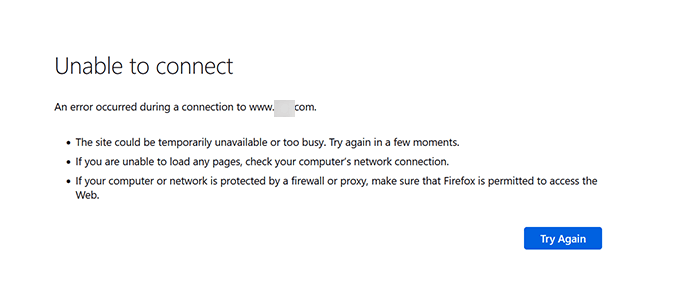
Frequent downtime threatens your revenue and reputation. You lose potential visitors, sales, and trust whenever your website goes offline.
Consequences Research shows that downtime can cost businesses anywhere from $137 to $427 per minute. So, if your site regularly goes down, you’re losing much more than just a few minutes of traffic—you're losing money.
Causes There are many reasons for website downtime, including traffic overloads, malware attacks, and server issues. However, at the core of most problems lies one primary issue, which is low-quality hosting.
The Solution A reliable hosting provider should guarantee a 99.9% uptime, which equates to only about 43 minutes of downtime per month. Anything more than that is unacceptable.
Choose a hosting provider that guarantees solid uptime and offers proactive monitoring.
3. When Your Web Host Fails to Provide Reliable Support
Website issues don't clock out at 5 PM. A crash, a security breach, or sluggish performance can happen at any moment. When that happens, getting real and fast support becomes non-negotiable.
Consequences Slow or ineffective support can lead to lost revenue, frustrated visitors, and even security risks. Every minute of downtime harms your credibility and bottom line.
Causes Not all “24/7 support” is what it claims to be. Some rely on chatbots that loop you through scripted responses. Others make you wait for hours before you even hear from a human.
If you’ve run into any of these issues, your host is holding you back:
- Long wait times, even for minor issues
- Unhelpful or incorrect responses that leave problems unresolved
- Recurring technical problems with no lasting fixes
- Dismissive or unprofessional support agents
The Solution If your hosting provider treats reliable support as an afterthought, it’s time to find a better web host.
Check for:
- Genuine 24/7 human support
- Platform-specific expertise
- Efficient response times
- Proven track record (reviews on G2, Trustpilot)
4. When Your Website Can’t Handle Increased Traffic
Consider switching your host if your website’s performance is lagging or struggling to handle increased traffic.
Consequences When your website struggles to handle growth, the effects exceed slow load times. They impact user experience, increase bounce rates, and could even harm your revenue.
Causes Most of the time, it comes down to limited resources. As your website grows, so do the demands on your hosting plan.
The Solution Find a hosting solution that grows with you—cloud-based or VPS hosting is ideal because it adjusts resources based on traffic.
5. When Your Website Security is Constantly at Risk
Website security isn’t something you should take lightly. If your site has been compromised or you are constantly facing security issues, reconsider your hosting provider.
Consequences A breach can cost you money, reputation, and customer trust. Malware or data theft can become a PR nightmare.
Causes Weak security from your hosting provider—lack of SSL, DDoS prevention, firewalls, or monitoring.
The Solution Choose a host that includes SSL, firewalls, DDoS protection, round-the-clock monitoring, and reliable backup/recovery tools.
6. When Your Hosting Provider Lacks Essential Tools
Running a website shouldn’t feel like a struggle. A good hosting service should make tasks like backups, updates, and monitoring straightforward.
Consequences Without automated backups or staging environments, you risk data loss and downtime. A clunky control panel wastes time.
Causes Providers that don’t prioritize essential management tools.
The Solution Choose a host with intuitive dashboards, automatic backups, and staging environments.
7. When Your Website Shows Database Connection Errors

If your website keeps showing errors when trying to establish a database connection, it signals something is wrong with your hosting service.
Consequences Repeated errors lead to poor UX, slower load times, and potential SEO impact.
Causes Overloaded database servers, shared DB resources, or poorly coded plugins.
The Solution Contact support to move your DB to a less congested server or optimize DB requests. Consider switching if support is ineffective.
8. When Your Hosting Costs Keep Rising Without Real Benefits
When hosting costs keep rising without any real improvements in service, it indicates something isn’t right.
Consequences Hidden costs can turn a cheap plan into an expensive one—extra charges for backups, SSL, or scaling.
Causes Unclear pricing or providers charging for basic features.
Solution Pick providers with transparent pricing and essential features included.
9. When Your Web Host Uses Outdated Technology
If your web host still relies on older server software (outdated PHP versions) or HDDs, your website could face serious setbacks.
Consequences Older software can lack security updates; slow hardware reduces speed and harms SEO.
Causes Cost-cutting or slow upgrades by the host.
Solution Switch to a host offering NVMe SSDs, LiteSpeed servers, and PHP 8+.
How to Prepare for Switching Hosts and How to Choose a Web Host?
Switching hosting providers can feel like a big step. But with the right preparation, it doesn’t have to be overwhelming.
They might fix issues or offer a better deal.
- Have a Word with Your Current Web Host Provider
Ensure new host supports PHP versions, plugins, and software requirements.
- Check for Compatibility
List DNS settings, databases, email accounts, and other essentials.
- Review Your Current Setup
Full backup before migration.
- Back Everything Up
Inform users and post updates if downtime is expected.
- Plan for Some Downtime
Migrate during off-peak hours.
- Pick the Right Time
DNS changes can take up to 48 hours to propagate.
- Update Your DNS Settings
Check for broken links, missing files, or performance issues.
- Test the Site after Moving
Quick Overview: 9 Signs Your Hosting Provider Is Holding You Back
| Sign | Description | Potential Consequences | Suggested Solution |
|---|---|---|---|
| 1. Slow Website Load Times | Your pages take too long to load | Increased bounce rates, lost customers, poor SEO rankings | Switch to a host with optimized performance and modern infrastructure |
| 2. Frequent Downtime | Your website goes offline often | Lost revenue, damaged reputation, decreased trust | Choose a provider with at least 99.9% uptime and reliable monitoring |
| 3. Lack of Reliable Support | Customer support is slow or unhelpful | Prolonged issues, frustration, loss of sales | Ensure 24/7 support with quick response times from experienced staff |
| 4. Can't Handle Increased Traffic | Your website crashes or slows with more visitors | Lost sales, bad UX, lower SEO ranking | Upgrade to scalable hosting like VPS or cloud |
| 5. Website Security Risks | Insufficient security measures | Data breaches, loss of trust, legal issues | Choose host offering SSL, firewalls, and monitoring |
| 6. Lack of Essential Tools | Missing backups, staging, control panel features | Inefficient management, potential data loss | Opt for hosts with easy management tools and automated backups |
| 7. Database Connection Errors | Frequent DB errors impact functionality | Slow load times, poor UX, SEO issues | Switch to host with reliable DB management and stability |
| 8. Rising Costs Without Benefits | Fees increase without service improvements | Hidden costs turn cheap plans expensive | Choose transparent pricing with essentials included |
| 9. Outdated Technology | Provider uses old server software/hardware | Slow speeds, security risks, compatibility issues | Switch to host with NVMe SSDs, PHP 8+, modern stack |
The Final Words
Choosing the right web host for WordPress is more than just about uptime. It's about ensuring your website is fast, secure, and able to handle growth. If you're experiencing slow speeds, poor customer service, or outdated technology, it’s time to consider a change.
FastCow’s managed WordPress hosting offers optimized performance, automatic updates, and top-notch security. With FastCow, you’re investing in a platform that scales with your business.
Let us manage web hosting so you can focus on driving results.
FAQs
The process can take a few hours, though it might take a day or more, depending on your site’s setup.
- How long does it take to change website hosting?
You can update hosting through your hosting dashboard. If you need help, FastCow’s customer support can guide you.
- How do I update hosting?
If your site’s speed is slow, downtime is frequent, or it struggles with traffic, consider an upgrade.
- How do I know when to upgrade my web hosting plan?
You may face slower load times, more crashes, and security vulnerabilities.
- What happens if I don't upgrade my hosting plan?
Yes. A new provider may offer better performance and support.
- Can I switch hosting providers instead of upgrading?
Yes—always back up your site before upgrading.
- Do I need to back up my website before upgrading?
The best host depends on needs: performance, security, and support. Look for reliable uptime, fast speeds, and good support.
- What is the best web host?
Free hosts provide limited services (sometimes with ads). Examples: WordPress.com, Wix, InfinityFree.
- Which is a free web host?