





Building a website starts with selecting the right hosting service, yet the choice isn’t always straightforward. Many website owners find themselves debating between WordPress hosting vs. web hosting, unsure of which one aligns with their needs.
While both options act as the foundation for a website, they differ in performance, optimization, and management features.
Misconceptions about WordPress hosting further complicate the decision-making process. Some providers use the term as a marketing tool, leaving users wondering whether they truly need a specialized WordPress solution or if a standard web hosting plan will suffice.
This guide breaks down the key distinctions between the two and offers clear insights to help you make an informed choice.
Web Hosting vs. WordPress Hosting: Understanding the Difference
Choosing the right hosting service is imperative for performance, security, and scalability when setting up a website. While web hosting and WordPress hosting are often mentioned together, they serve different purposes.
Here’s a detailed breakdown of what WordPress hosting vs. web hosting means.
What Is Web Hosting?
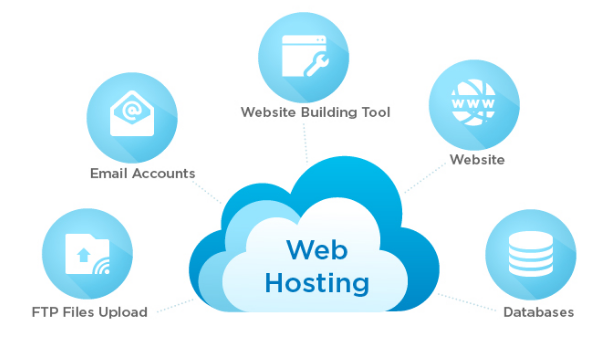
> Web hosting is a broad term that encompasses various types of hosting services designed to make websites accessible on the internet. A web hosting provider allocates space on a server to store a website’s files, images, databases, and other assets while ensuring connectivity to make the site accessible to users.
Types of Web Hosting
Web hosting can be categorized into four main types, each suited for different needs:
- Shared Hosting: Multiple websites share a single server's resources. Affordable for small businesses and personal websites but may lead to slower performance during traffic spikes.
- VPS Hosting (Virtual Private Server): Websites share a physical server but operate in isolated environments. Offers more control and scalability than shared hosting.
- Dedicated Hosting: A website gets an entire server, providing full control over performance, security, and configurations. Ideal for high-traffic or resource-intensive websites.
- Cloud Hosting: Websites are hosted across a network of virtual servers, ensuring high reliability, flexibility, and scalability. Best for growing businesses that need dynamic resource allocation.
Web hosting is not tied to a specific platform, meaning it can support various content management systems (CMS) like WordPress, Joomla, Drupal, and even custom-built websites.
What Is WordPress Hosting?
> WordPress hosting is a specialized type of web hosting that is optimized specifically for WordPress websites. It includes performance enhancements, security configurations, and tools tailored to streamline WordPress site management.
Key Features of WordPress Hosting
- Optimized Performance: Servers are configured for WordPress to ensure faster load times and efficient resource usage.
- Automatic Updates: Many WordPress hosting providers offer automatic updates for WordPress core, themes, and plugins.
- Built-in Caching: Improves site speed by storing static versions of web pages for faster delivery.
- Enhanced Security: WordPress-specific security measures such as malware scanning, firewalls, and DDoS protection.
- One-Click WordPress Installation: Simplifies setup, allowing users to get started quickly.
- WordPress Expert Support: Specialized support from teams knowledgeable in WordPress troubleshooting and optimization.
Managed vs. Unmanaged WordPress Hosting
- Managed WordPress Hosting: The hosting provider handles updates, security, performance tuning, and backups. Ideal for businesses or non-technical users.
- Unmanaged WordPress Hosting: Offers WordPress-optimized hosting but leaves management of updates and maintenance to the user.
The Advantages of WordPress Hosting
- Optimized Performance for WordPress
- Pre-configured server settings, PHP/MySQL optimizations, CDN integration.
- Enhanced Security for WordPress Sites
- Web Application Firewalls, malware scanning, automatic SSL.
- Simplified WordPress Management
- One-click installation, user-friendly dashboards, integrated backups, staging environments.
- Automatic Updates and Maintenance
- Automated updates, scheduled maintenance, expert server management.
- Superior Support from WordPress Experts
- Dedicated support, expert guidance, 24/7 availability.
- Better Plugin Compatibility and Functionality
- Pre-tested plugins, premium integrations, built-in optimizations.
- Reliable Uptime and Scalability
- Optimized environments, load balancing, scalable resources.
- Hands-Off Server Management
- Server monitoring, automatic resource allocation, regular updates.
- Built-in Staging Environments for Testing
- Test changes before going live, seamless deployment.
- Easy WordPress Migration
- Free/automated migration tools, minimal downtime, expert assistance.
The Disadvantages of WordPress Hosting
- Higher Costs Compared to Traditional Hosting
- Premium features increase costs, may not include email hosting.
- Limited Flexibility
- Plugin restrictions, incompatibility with other CMS platforms, reduced server control.
- WordPress Exclusivity
- Only for WordPress sites, may require separate hosting for other platforms.
- Plugin Limitations for Performance and Security
- Blocking resource-intensive plugins, limited customization.
Advantages of Standard Web Hosting
- Lower Cost Compared to Specialized WordPress Hosting
- Flexibility to Host Different Platforms or Custom Sites
- More Control over Server Configurations and Settings
- Ability to Choose Preferred Caching and Optimization Mechanisms
- Scalability Across Different Hosting Types
- Freedom to Implement Custom Security Measures
- Greater Storage Capacity at a Lower Cost
- No CMS-Specific Restrictions
- More Server Location Choices
- Custom Backup and Restore Options
Disadvantages of Standard Web Hosting
- Manual WordPress Installation and Configuration
- Lack of Specialized WordPress Support
- User-Managed Backups and Security
- Performance Variability Based on Server Architecture
What Is The Difference Between WordPress Hosting And Web Hosting?
| Feature | Standard Web Hosting | WordPress Hosting |
|---|---|---|
| Platform Optimization | Supports various platforms | Optimized exclusively for WordPress |
| Installation | Manual or one-click setup | Pre-installed or one-click setup |
| Updates | User-managed | Automatic for WordPress core/themes/plugins |
| Support | General technical support | Specialized WordPress support |
| Performance | Manual optimization | Built-in caching and optimizations |
| Security | General security features | Advanced WordPress security |
| Backups | User-managed | Automated backups included |
| Scalability | Varies by plan | Optimized for WordPress growth |
| Hosting Other Software | Any CMS or website | Primarily WordPress-only |
| Limitations | Few restrictions | Some plugin/customization limits |
| Email Hosting | Often included | Sometimes restricted |
Web Hosting vs. WordPress Hosting: Which One is Right for You?
With over 338,561 web hosting providers worldwide, selecting the right hosting plan isn’t just about picking a provider. It’s about choosing a solution that aligns with your website’s needs, performance expectations, and growth potential.
Choose Standard Web Hosting If You
- Need Flexibility across Multiple Platforms
- Prefer Full Control over Server Configurations
- Are Comfortable Managing Technical Aspects
- Are Looking for a Budget-Friendly Option
Choose WordPress Hosting If You
- Run a WordPress Website & Want Optimized Performance
- Want Hassle-Free Maintenance & Security
- Need Better Scalability for Traffic Spikes
Which One Should You Choose?
If you want a budget-friendly, flexible solution with full control and don’t mind managing updates and security, go for standard web hosting. But if you want a fully managed, high-performance hosting experience optimized for WordPress, then WordPress hosting is the better choice.
Conclusion: Finding the Right Hosting for Your Website
It all comes down to your website’s needs when deciding between WordPress hosting vs. web hosting. If you want the flexibility to run different platforms, standard web hosting gives you a blank slate to configure your site as you see fit.
However, if your website is built on WordPress, a managed WordPress hosting solution is optimized to deliver faster load times, built-in security, automatic updates, and expert WordPress support.

This is where FastCow stands out. As a WordPress-managed hosting provider, FastCow ensures your website runs at peak performance, even during high-traffic periods. With automatic updates, enhanced security, daily backups, and a support team, you get a hassle-free hosting experience designed to keep your site secure and scalable.
Don’t settle for just any hosting. Choose one built for WordPress success. Get started with FastCow today!
FAQs
1. What is the difference between WordPress hosting and dedicated hosting?
WordPress hosting is designed for WordPress sites with built-in optimizations. Dedicated hosting gives you full control over an entire server, ideal for high-traffic sites or custom applications.
2. What is the difference between WordPress hosting and SSD hosting?
WordPress hosting is optimized for WordPress, often including managed services. SSD hosting means the server uses solid-state drives for faster speeds. Many WordPress hosts use SSDs, but SSD hosting isn’t exclusive to WordPress.
3. Do I need web hosting for WordPress?
If you're using WordPress.org, you need web hosting. WordPress.com includes hosting as part of its service.
4. What's the difference between shared hosting and WordPress hosting?
Shared hosting is general-purpose and affordable. WordPress hosting is fine-tuned for WordPress sites, offering features like pre-installed WordPress, automatic updates, and better security.
5. Is WordPress a Web Host?
No, WordPress is a CMS. You need a hosting provider to launch a WordPress site.
6. Does WordPress Include Hosting?
WordPress.org does not include hosting. WordPress.com is a hosted platform.
7. Do I Need WordPress Hosting? Is WordPress Hosting Worth It?
WordPress hosting is a smart investment for WordPress sites, offering smooth performance, security, and support.
8. Can I host a non‑WordPress website on WordPress hosting?
Some WordPress hosting plans allow non-WordPress sites, but it’s not recommended.
9. Is WordPress hosting more expensive than standard hosting?
WordPress hosting often costs more due to specialized optimizations and support.
10. What Is Managed WordPress vs. Web Hosting?
Managed WordPress hosting handles updates, security, and optimizations. Standard web hosting gives you more control but requires manual management.